
Vehicle Hub · Land Rover Discovery 5 L462
Discovery 5 — Diagnostics, Coding & Retrofits
The fifth-generation Discovery (2017–present) — full DoIP diagnostic coverage with Pathfinder and TOPIx Cloud, the faults we see most, and every supported retrofit from park assist to deployable tow bars.
Model Overview
From the park assist retrofit Discovery 5 owners request most to full DoIP diagnostics, this hub covers the L462. The Discovery 5 launched in 2017, moving the nameplate onto the aluminium platform family shared with the Range Rover line — a decisive break from the Discovery 3/4's body-on-frame-derived architecture. With the new platform came a new electronic era: the Discovery 5 is a DoIP vehicle from launch, and the 2021 facelift added Pivi Pro infotainment and further electronics revisions. Factory specifications are published on the official Land Rover Discovery site.
Key facts:
- Model years: 2017–present (facelift 2021)
- Seating: five or seven seats; commercial variants in some markets
- Powertrains: Ingenium four- and six-cylinder petrol and diesel (P300, P360 MHEV, D250, D300 MHEV, plus earlier Td6 and Si6 units)
- Electronics architecture: DoIP — no SDD coverage
- Infotainment: InControl Touch Pro (2017–2020); Pivi Pro (2021 facelift onwards)
Diagnostics on the Discovery 5
The Discovery 5 follows the modern JLR toolchain: Pathfinder handles diagnostics, TOPIx Cloud handles programming, and a DoIP-capable interface connects the two — no SDD fallback exists:
- Pathfinder — complete guided diagnostics, DTC read/clear, live data and service routines over DoIP
- TOPIx Cloud — required for online ECU programming, software updates, security operations and key work. Subscription and short-duration pass options are on the TOPIx Cloud hub
- VCI hardware — native DoIP is mandatory; CAN-only interfaces cannot connect to this vehicle. The SX-Tool JLR Interface handles Discovery 5 work plus the entire classic fleet via SDD; the comparison guide covers all options
Engineering-level tasks — CCF edits beyond the guided menus, used-module adaptation, recovery from interrupted programming — are JET Master territory.
Diagnostic Quick Reference
| Item | Discovery 5 L462 |
|---|---|
| Diagnostic application | Pathfinder |
| Online portal | TOPIx Cloud (required for programming) |
| Protocol | DoIP only — no SDD |
| VCI requirement | Native DoIP (genuine, DA-DoIP, SX-Tool, VNCI) |
| Key programming | Online via TOPIx Cloud |
| Infotainment | Touch Pro (2017–2020) / Pivi Pro (2021–) |
Common Discovery 5 Faults
From daily workshop and remote-support experience: these are the faults that actually bring Discovery 5s in — electrical and software issues ahead of mechanical ones by a wide margin:
- Air suspension faults — the most common Discovery 5 complaint. Compressor wear, valve block leaks and height sensor drift all present as "suspension fault" messages. Pathfinder's guided routines distinguish the three and handle recalibration after repairs.
- InControl Touch Pro / Pivi Pro issues — frozen screens, failed updates and camera faults; mostly software, resolved with controlled reloads.
- SOS / TCU warnings — telematics backup battery degradation triggers "SOS limited functionality" on 2017–2020 builds especially.
- 12V battery and power-management warnings — battery monitoring reset required after replacement; a common cause of recurring warnings.
- AdBlue / SCR system faults on diesel builds — tank level sensors, dosing modules and quality sensors; guided tests isolate the failing component.
- Parking brake and EPB module faults — service routines handle actuator replacement and calibration.
- Water ingress around the tailgate and antenna — can corrupt convenience modules; worth checking before condemning electronics.
Supported Retrofits & Feature Activations
The Discovery 5's family-and-towing role drives its most requested upgrades: tow bars, park assistance and interior comfort features top the list, and nearly all are software-led activations once the hardware is fitted:
Towing & Practicality
- Electrically deployable tow bar — genuine hardware with full coding, plus tow-bar electrics configuration
- Advanced tow assist activation
- Surround camera and rear camera upgrades for hitching and parking
Driver Assistance
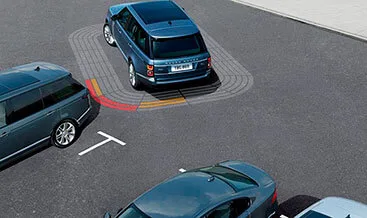
- Park assist retrofit — parallel and bay parking assistance with full sensor integration and coding
- Adaptive cruise control with steering assist on compatible builds
- Blind spot assist and traffic sign recognition activation
- Auto high beam assist activation
- Lane keep assist activation on compatible builds
Comfort & Convenience
- Heated steering wheel and heated seats (all three rows where hardware allows)
- Soft-close doors on compatible builds
- Powered inner tailgate and gesture tailgate configuration
- Ambient lighting upgrades
- Activity Key enablement
Infotainment & Configuration
- CarPlay / Android Auto activation on compatible Touch Pro and Pivi Pro builds
- Meridian sound system upgrades
- Configurable stop-start, wade sensing and all-terrain progress control activation
- Import conversions — speed limit correction and radio region conversion
As with all modern JLR vehicles, build year and market determine what is possible. Send your VIN before ordering and we will confirm the exact supported list for your Discovery 5.
How a Remote Coding Session Works for Your Discovery 5
Software activations and configuration changes are done remotely in most cases: the vehicle stays on your premises while our technician works through a live SX-LINK session, typically inside an hour:
- Order the service at sx-tool.com/en/shop and book a session slot
- Connect a native DoIP interface to the vehicle and an internet-connected laptop (hire kits available)
- Our technician connects remotely, verifies the vehicle and completes the work — typically 30–60 minutes
- Test together before the session closes
Hardware retrofits (tow bars, park assist sensors, cameras) ship worldwide with fitting instructions; coding follows remotely once installed.
Discovery 5 Retrofit Prices and Buying Options
How much does a Discovery 5 retrofit cost? Software-led Discovery 5 coding — CarPlay activation, adaptive cruise, configurable dynamics, tow bar commissioning — runs as single remote session fees, while hardware retrofits like the 360 camera, park assist and the Pivi Pro upgrade combine parts, fitting and commissioning. Every Discovery 5 retrofit for sale at sx-tool.com/en/shop is quoted per VIN at current 2026 pricing.
Send your VIN and we confirm exactly what each Land Rover Discovery 5 activation needs — many features are pre-wired and simply disabled, so the Discovery 5 accessories price is often far lower than expected. Remote sessions complete in about an hour wherever the vehicle is parked, hardware kits ship worldwide with coding included, and 2026 activations carry our support into 2027.
Frequently Asked Questions
Can I use SDD on a Discovery 5? No. The Discovery 5 is DoIP-only from its 2017 launch. SDD covers the Discovery 3 and 4; the 5 requires Pathfinder, with TOPIx Cloud for programming.
Is park assist a realistic retrofit on the Discovery 5? Yes — it is one of our most common Discovery 5 jobs. It requires the sensor hardware installed and then full coding and calibration. Compatibility depends on build year and existing parking sensors, so we VIN-check first.
My air suspension shows a fault — compressor or software? Either is possible, and so is a leaking valve block or a drifting height sensor. Pathfinder's guided routines distinguish them before you spend on parts. Post-repair calibration is a guided routine, not guesswork.
The dash says "SOS limited functionality" — what is it? Almost always the telematics backup battery at end of life. Replacement plus a configuration reset clears it properly; it is a quick, routine job.
Do you support Discovery 5 Commercial variants? Yes — diagnostics, coding and retrofit work covers passenger and commercial variants. Market-specific conversions (speed limit, radio region) are also available for imported vehicles.
How do I activate CarPlay on a Discovery 5? Discovery 5 CarPlay activation is a remote coding job on Pivi Pro and later Touch Pro builds — the hardware already supports it, so no parts are needed. A short session enables CarPlay and Android Auto with factory-identical behaviour. Early builds occasionally need an infotainment software update first; your VIN tells us before booking.
How do I activate adaptive cruise on a Discovery 5? Discovery 5 adaptive cruise activation is coding-only where the radar is fitted — common on 2017+ builds — making it a one-hour remote session. Vehicles without the radar need hardware first, which changes the quote; we verify from your VIN. Once commissioned, the system includes queue assist where the specification allows.
Can I retrofit a 360 camera to a Discovery 5? A Discovery 5 360 camera retrofit adds the surround camera system: genuine camera modules, mirror housings where required, wiring, and a commissioning session with calibration. Existing park-assist levels change the parts list, so we quote per VIN. After remote commissioning the bird's-eye view behaves exactly like factory fitment.
How do I upgrade a Discovery 5 to Pivi Pro? The Discovery 5 Pivi Pro upgrade replaces the earlier infotainment with the newer system — a hardware-plus-coding retrofit quoted per VIN. For many owners, activating CarPlay on the existing system delivers the daily benefit at a fraction of the cost. We lay out both paths honestly once we know your build.
Does a Discovery 5 tow bar need coding? Yes — Discovery 5 tow bar coding is required after fitting: the vehicle must learn the tow bar and trailer module exist, or the socket stays dead and trailer stability functions stay inactive. A remote session commissions the bar and, on deployable units, calibrates the mechanism. Fitting can be done locally; the coding is ours.
How do I activate Discovery 5 configurable dynamics? Discovery 5 configurable dynamics coding unlocks the adjustable driving modes where the hardware supports them — throttle, steering and suspension maps become driver-configurable through the screens. Activation is a remote session with no parts on suitably equipped builds. Your VIN confirms eligibility before you pay anything.
What are common Discovery 5 coding problems and fixes? Common Discovery 5 coding problems are features dropping after software updates, calibration warnings after glass or bumper work, and accessories staying dead until commissioned. Fixes are procedural: re-apply configurations, run calibration routines, restore as-built CCF when things get confused. Our remote sessions handle Discovery 5 cases every week.
What do Discovery 5 retrofit reviews and forums say? Discovery 5 retrofit reviews across forums and Reddit praise the platform's upgrade headroom — CarPlay, cameras and driver assists top the satisfaction list — with the recurring caution that generic tools cannot perform the activations. The consistent community advice: verify VIN compatibility first and use a specialist for coding. That is our daily work.
Where can I find a Discovery 5 manual, PDF or wiring diagram? Official Discovery 5 workshop manuals and wiring diagrams are hosted on JLR's TOPIx Cloud portal — no legitimate free PDF source exists. A short TOPIx pass opens the full library for your VIN. Our retrofit kits include the relevant wiring and fitting guidance, so most installations complete without additional documentation.
Discovery 5 vs Discovery 4 — A Note for Workshops
The jump from Discovery 4 to Discovery 5 is the jump from SDD to DoIP. Workshops with a long Discovery customer base need both toolchains:
- Discovery 3/4 (2004–2016): SDD over CAN — fully offline-capable, cheap to equip
- Discovery 5 (2017–present): Pathfinder + TOPIx Cloud over DoIP
One native CAN+DoIP interface covers both eras; see the tool comparison for the hardware detail, and our SDD vs TOPIx Cloud explainer for the software side.
Related Guides
For the jobs Discovery 5 owners book most often — parking assistance, key programming and software recovery — these guides carry the full detail, part numbers included where relevant.
- JLR diagnostic tools compared
- TOPIx Cloud subscriptions and passes
- Defender L663 hub
- Range Rover Velar hub
Get Started
Discovery 5 retrofit hardware, software and activation services are at sx-tool.com/en/shop — or contact us with your VIN for a confirmed compatibility quote. Remote coding sessions are available worldwide, and our technicians handle everything from park assist retrofits to module recovery.
Serving Discovery 5 customers worldwide. Discovery 5 coding and retrofits reach owners and workshops across the UK, USA, Australia and 40+ other countries — remote sessions happen wherever the vehicle is parked and hardware ships tracked worldwide, so "Discovery 5 retrofit near me" means your own driveway with our technician connected live.
Last updated: 25 September 2026 · Written and reviewed by the SX-Tool technical team.
Last updated:
Ready to work like a dealer?
Order your SX-Tool interface today — worldwide shipping, 24-month warranty.
Visit the ShopGet the tools & parts
The hardware, software and services behind this guide — genuine SX-Tool products, worldwide shipping, 24-month warranty.
L663 Electrically deployable tow bar
The electrically deployable tow bar is hiding behind the bumper, providing a clean and attractive look.…
US$2450.00 View in the shop
JLR CarPlay AndroidAuto Upgrade Retrofit Kit
JLR Apple CarPlay Androidauto upgrade module. the activation demand OEM JLR VCI kit like DOIP to work with…
US$369.00 View in the shop
Range Rover 2017 Adaptive Cruise Control with Stop & Go activation
By reprogramming the Start/Stop system, we change the algorithm of the system, and it will remember your…
€1439.04 View in the shop