
The Process
How Remote JLR Activation Works
Unlocking hidden features on your Jaguar or Land Rover is fast, safe and entirely remote — our master technicians do the work while you watch. No technical skills required.

What Remote JLR Activation Means
Remote JLR Activation is a live session where an SX-Tool technician connects to your laptop over the internet and codes or programs your Jaguar or Land Rover through your own ENET cable. Features like Apple CarPlay, Video in Motion or Auto Start/Stop memory are flashed directly to the vehicle's modules — typically in 15 to 30 minutes.
What You Will Need
You need three things ready before the session starts, and none of them are exotic. A quick checklist: a Windows laptop, an ENET/OBD2 cable to reach the car, and a stable internet connection that reaches wherever the car is parked. Our technicians verify everything again at the start of the session.
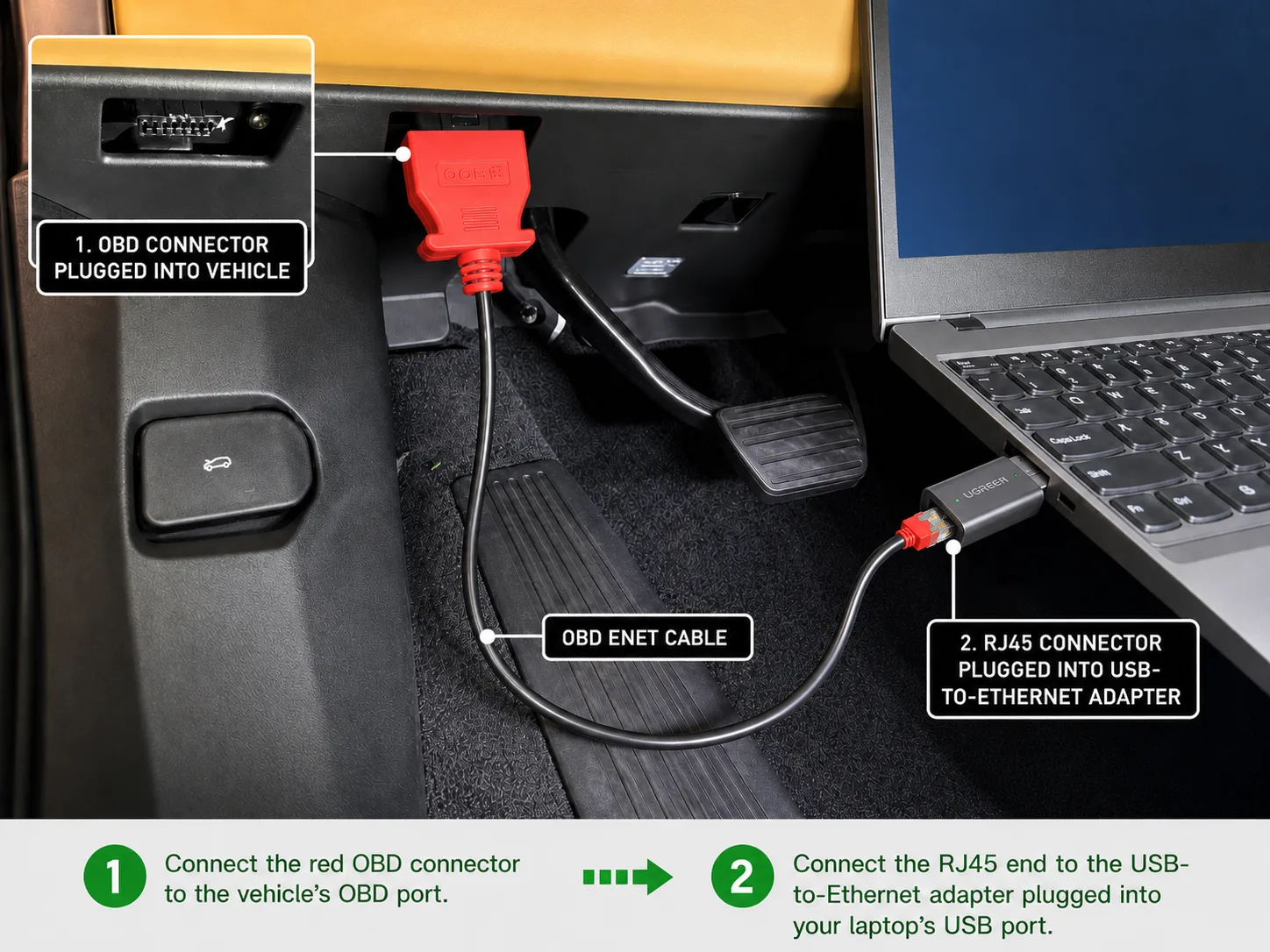
- A Windows laptop — Windows 10 or 11. MacBooks only work when running Windows via Boot Camp; Parallels and other virtual machines are not supported.
- An ENET / OBD2 cable — a standard ENET cable between the laptop and the vehicle's OBD2 port. Some older models need a DoIP VCI instead — your product page or our team will confirm.
- Internet connection — strong Wi-Fi reaching the garage, or a good 4G/5G mobile hotspot, both work perfectly.
The 4-Step Activation Process
The whole process runs in four steps, from checkout to enjoying the new features, and most sessions finish within half an hour once connected. You never need to touch the software yourself — the technician drives, you watch, and the car restarts with its new features active.
-
Place your order — pick the activation for your model in the shop. You immediately receive an order confirmation with preparation instructions.
-
Download the remote software — install AnyDesk or TeamViewer on your Windows laptop so our technician can temporarily access it.
-
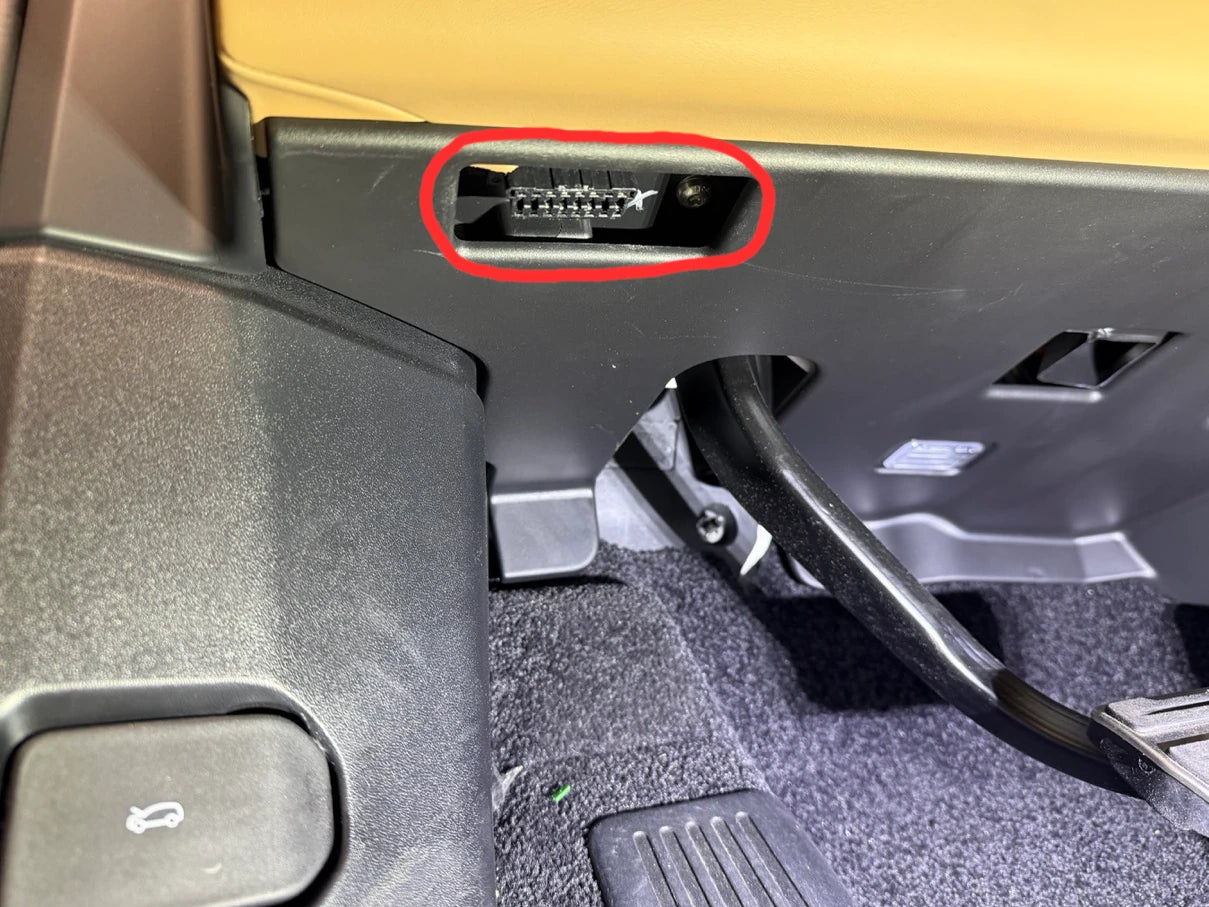
Connect to your vehicle — plug the ENET/diagnostic cable into the OBD2 port (usually under the steering wheel area) and the laptop. Ignition ON, engine OFF.
-
Start the remote session — send us your order number and AnyDesk/TeamViewer ID via contact, WhatsApp +852 8493 6834 or the chat bubble, bottom right. The technician connects, configures the software and flashes the activation — usually 15–30 minutes. Restart the infotainment system and enjoy.
Safety During the Session
Module programming is safe when the basics are respected: a stable vehicle power supply, no interruptions to the laptop or cables, and no touching the ignition unless instructed. Our technicians follow the same discipline on every session and will pause rather than risk a module — details in the remote-support disclaimer within our terms of use.
Frequently Asked Questions
Do I need any technical skills? No. You connect the cable and share your remote-access ID; the technician performs every software step. That is the entire point of the service.
How long does a session take? Most activations take 15–30 minutes once connected. Complex module programming or infotainment firmware work can take longer — we confirm the expected duration before starting.
What if my car is an older model? Older CAN-era vehicles may need a JLR DoIP VCI or a different cable — check the remote coding service page or send us your VIN via the free VIN decoder and we will confirm the exact hardware.
What happens if something interrupts the session? Stable power and internet minimise risk, and the technician monitors every flash. If a job genuinely cannot be completed as agreed, our money-back commitment applies — see JLR remote repair.
Ready to Upgrade Your JLR?
Browse supported models and features under services or the retrofit catalogue, then order your activation online. Questions first? Contact us with your VIN — a technician will confirm exactly what your vehicle needs. It takes one message to get started.
Last updated: 24 September 2026 · Written and reviewed by the SX-Tool technical team.
Last updated:
Ready to work like a dealer?
Order your SX-Tool interface today — worldwide shipping, 24-month warranty.
Visit the ShopGet the tools & parts
The hardware, software and services behind this guide — genuine SX-Tool products, worldwide shipping, 24-month warranty.
SX-DOIP | The Ultimate Universal JLR Diagnostic Interface
Introducing the SX-DOIP, the definitive diagnostic VCI for JLR professionals. Engineered to perfectly proxy…
US$999.00 View in the shop
JLR TOPIX Cloud Online Access
Dealer Portal Access for the JLR TOPIX Cloud. Must have for 2024-2025 JLR Vehicles. Unlock the full…
€95.04 View in the shop
Incontrol Touch Pro Map Update 2025 Africa, Middle East, Europe
Landrover Range Rover InControl Touch Pro Map Update 2025, Sat Nav Conversion Latest Maps the latest
US$159.00 View in the shop