
JLR 3G Shutdown: How a TCU Upgrade Saves Features
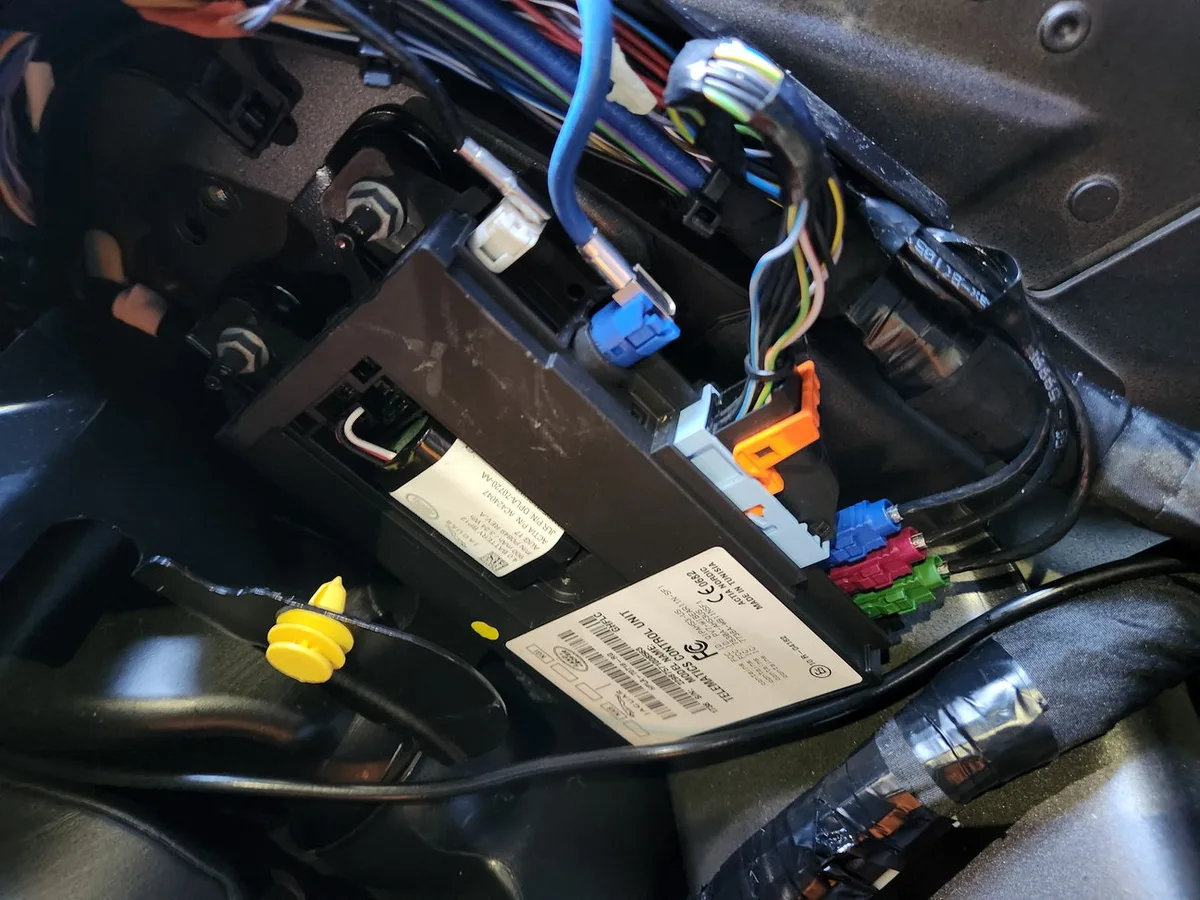
The Short Answer
The JLR 3G shutdown — carriers switching off 3G networks worldwide — has silently disabled every cellular-connected feature on pre-2018 Jaguar and Land Rover vehicles fitted with a 3G Telematics Control Unit (TCU). It is not a fault in your car; it is obsolescence. The only fix is replacing the 3G TCU with a compatible 4G/LTE unit and programming it to the vehicle.
This guide explains which vehicles are affected, exactly which features stop working, and what the upgrade involves. If your TCU is showing fault symptoms rather than obsolescence, our JLR TCU replacement guide covers the broader diagnosis picture.
Which Vehicles Are Affected
Any JLR vehicle built with a 3G-only TCU — broadly the 2014 to 2017 model years — loses cellular connectivity when local carriers complete their 3G switch-off, regardless of how well the car itself is maintained. Mileage, condition and service history are irrelevant; the limitation sits in the modem generation, not in the vehicle.
The affected fleet includes some of the most popular models on the road: Range Rover and Range Rover Sport, Discovery Sport, Jaguar F-Pace, XE and XF from that era. Later vehicles with 4G-capable telematics are unaffected. Because carriers retired 3G on different schedules by country, some owners lost features years ago while others are only now seeing them fail — which is why the symptom often gets misdiagnosed as a module fault. Our guide to signs of a failing JLR TCU helps separate obsolescence from genuine hardware failure.
What Stops Working — and What Doesn't
Everything that depends on the TCU's cellular link dies with the 3G shutdown: the InControl Remote app, live traffic, stolen vehicle tracking, the Wi-Fi hotspot and online media. Local functions like Bluetooth and GPS navigation keep working. The split is simple — if a feature needs the outside world it is gone; if it runs inside the car, it stays.
The full casualty list:
- InControl Remote app — no remote lock/unlock, remote start, or vehicle status checks.
- Live traffic information — navigation reverts to static routing.
- Stolen vehicle tracking — the subscription service can no longer reach the car.
- In-car Wi-Fi hotspot — no data connection to share.
- Online media and InControl apps — streaming and connected services stop.
Features that do not use cellular data — Bluetooth phone pairing, satellite radio where fitted, standard GPS navigation with stored maps — continue normally. Some owners also see SOS-related warnings; our JLR SOS system inactive fix guide covers that specific symptom.
The Solution: Upgrade to a 4G/LTE TCU
The only permanent fix for the 3G shutdown is hardware: replacing the obsolete 3G TCU with a genuine 4G/LTE unit from a later model year, then programming it to the vehicle's VIN and feature set with JLR-level tooling. No software update or subscription change can revive a dead network generation.
In many cases the swap is near-direct, but "near" does real work in that sentence. The process requires:
- The correct part. A genuine 4G TCU compatible with your vehicle's architecture — part number selection matters, and the wrong unit will not integrate.
- Professional installation. The TCU typically lives behind interior trim or under the headliner; fitting is straightforward for a competent workshop but not a casual DIY job.
- Programming. The new TCU must be written to your VIN and configured for your feature set using Pathfinder with a TOPIx Cloud subscription, connected through a compatible interface such as a DoIP VCI.
Be aware that a failing TCU backup battery can produce confusingly similar warnings — our TCU backup battery failure guide is worth reading before ordering parts.
How to Confirm Your TCU Generation
Before ordering anything, confirm what is actually fitted — a diagnostic session reads the TCU's hardware and software identity directly, removing all guesswork from part selection. Ten minutes of checking beats a wrong part order, and the same session rules out the cheaper lookalike faults before you spend anything at all.
Three quick checks, easiest first: the InControl account portal shows your vehicle's connected services status, and a car that silently dropped off around the local 3G switch-off date is telling you something. Physical identification is possible once trim is removed — the module label states the hardware generation. But the definitive route is a scan with JLR-level tooling, which reports the TCU part number, firmware level and network capability in plain terms. That scan also rules out the lookalike faults: a dead backup battery or a lapsed subscription produces similar symptoms to obsolescence and costs far less to fix. Ten minutes of diagnosis beats a wrong part order every time — and it gives you the exact part family the 4G replacement must come from.
The Upgrade, Step by Step
A typical 4G TCU upgrade runs as a half-day job split between hands-on fitting and remote programming — the physical swap at a local workshop, the commissioning from our desk. The split keeps costs sensible and means the job can happen almost anywhere, not just within driving distance of a specialist.
Once the correct 4G unit is on hand, the sequence is: trim removal and module swap; battery-maintained power-up; diagnostic connection; VIN write and feature configuration; then verification of each connected service — app pairing, live traffic, hotspot — before the car is released. Most customers book the whole thing as one coordinated job: we confirm the part, support the programming remotely, and the vehicle leaves with every connected feature restored and years of network support ahead of it.
Is the Upgrade Worth It?
For owners who use connected features, the 4G TCU upgrade restores everything the 3G shutdown took — and future-proofs the vehicle for the remaining life of 4G networks, which carriers plan to support for many years yet. For owners who never used those features, the honest answer is that the status quo costs nothing and loses nothing.
The honest calculation: if you never used the InControl app, live traffic or the hotspot, the upgrade buys you little, and the car drives exactly as before. If you relied on remote start in winter, valued stolen vehicle tracking, or simply want the features you paid for, the upgrade is the only route back. Typical costs — a genuine 4G TCU plus installation and programming — land in the mid hundreds to low four figures depending on model and market, well short of the value the features add to daily use and resale. Remote programming support can keep the labour portion lean for workshops handling the physical swap themselves.
Frequently Asked Questions
How do I know if my car has a 3G TCU? If the vehicle is roughly 2014–2017 and connected features stopped working without any fault message, 3G obsolescence is the likely cause. A diagnostic session can confirm the TCU hardware generation definitively.
Will my navigation still work after the 3G shutdown? Yes — GPS positioning and stored map navigation are local functions and do not depend on the cellular network. You lose live traffic overlays and online destination search, not the maps themselves.
Can the 4G TCU upgrade be done remotely? The programming and configuration side can be performed remotely once the hardware is physically installed. The module swap itself requires hands on the car — a local workshop can do the fitting while we handle the coding.
Does the upgrade restore the InControl Remote app? Yes, once the 4G TCU is installed, programmed and your InControl account is re-linked, app functions — remote lock/unlock, status checks, journeys — return to normal.
Is 4G future-proof, or will this happen again? Carriers have committed to 4G/LTE support for years to come; it underpins current networks alongside 5G rather than being displaced by it. A 4G TCU is a durable fix, not a stopgap.
Restore Your Connected Features
The 3G shutdown took your connected features, but it does not get to keep them — a 4G TCU upgrade brings everything back with years of network life ahead. SX-Tool can help you source the correct 4G TCU and handle the programming — start with our remote coding service or browse telematics parts and services at sx-tool.com/en/shop/.