
7 Signs of a Failing JLR TCU (Telematics Unit)
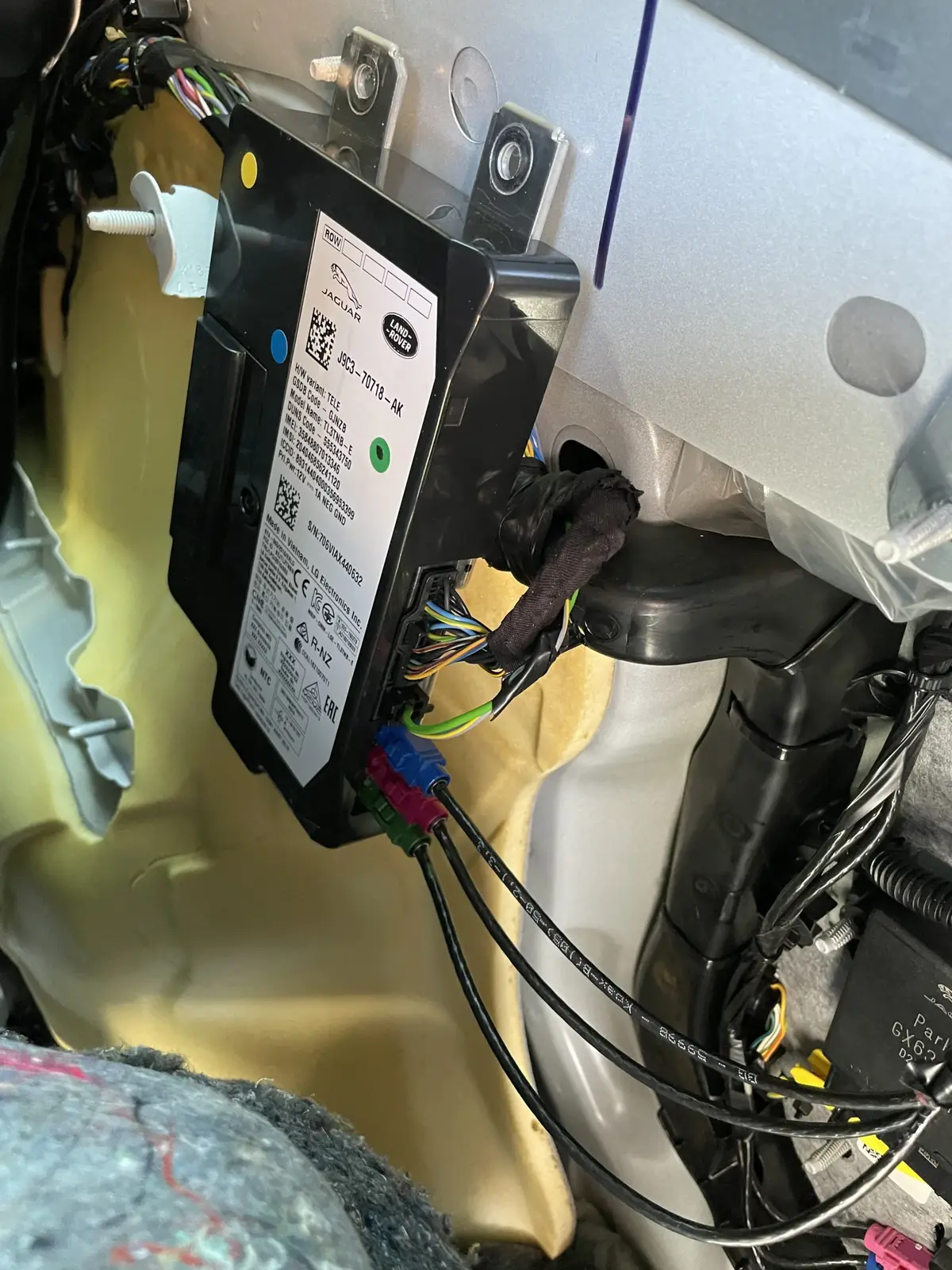
The Short Answer
A failing JLR TCU (Telematics Control Unit) announces itself through connected-services symptoms long before it dies completely: SOS System Inactive or SOS Limited Functionality warnings, an InControl app that stops updating, remote features that stop working, failed over-the-air updates, and — the sneaky one — an unexplained 12 V battery drain. Most of these symptoms also have cheaper causes (notably the TCU's own backup battery), so confirm the diagnosis before buying a module.
Here are the seven signs, how to tell the TCU apart from its lookalikes, and what to do about each one.
What the TCU Does (30 Seconds)
The TCU is the vehicle's phone: a mobile-network module that handles the SOS /emergency call function, the InControl Remote app connection, tracking, and the data pipe for over-the-air software updates.
Because it sits between the car and JLR's servers, its failure symptoms are always about connectivity and remote services — not driving. A failed TCU strands the connected features; the car itself still runs. That distinction matters for diagnosis: mechanical complaints are never the TCU.
The Seven Signs of a Failing JLR TCU
The seven signs below are the pattern we see across thousands of remote sessions — one sign alone is a hint, two or more together are a diagnosis waiting to be confirmed.
- "SOS System Inactive" warning at start-up. The TCU's emergency-call self-test failed. The single most common TCU-related complaint.
- "SOS Limited Functionality" message — the milder sibling: emergency calling degraded, usually flagging the backup battery rather than the whole module.
- InControl Remote app stops updating. Last journey, fuel level and vehicle status freeze at a date — the car has stopped talking to JLR's servers.
- Remote features dead. Remote start, lock/unlock and climate commands fail or time out.
- SOTA updates fail or never arrive. The TCU is the download pipe for over-the-air updates; a sick TCU is behind many SOTA lockdown cases.
- Unexplained 12 V battery drain. A TCU that fails to sleep keeps the bus awake and flattens batteries overnight — the car "mysteriously" dies every few days.
- TCU off the network in diagnostics. A full scan shows the module not responding, or reporting internal/backup-battery DTCs.
TCU vs Backup Battery vs Infotainment: Don't Mix Them Up
The most expensive mistake in this territory is replacing a TCU when the fault is its backup battery — or blaming the infotainment screen for a telematics problem.
| Symptom | TCU module | TCU backup battery | Infotainment (IMC) |
|---|---|---|---|
| SOS Limited Functionality at start-up | Possible | Most likely | No |
| SOS System Inactive, persistent | Likely | Possible | No |
| App/remote features dead | Likely | No | No |
| Black screen / no audio | No | No | Yes |
| Battery drain overnight | Possible (no sleep) | No | Possible |
| Failed OTA updates | Possible | Possible | Possible |
The backup battery is a small rechargeable cell inside the TCU with a 5–8 year life; it fails far more often than the module itself and is covered in our TCU backup battery guide. For screen-side symptoms, see the Pivi Pro black screen guide.
Checks You Can Do Yourself
Before booking anything, three free checks eliminate the common impostors — and occasionally fix the problem outright. Remember the TCU exists primarily for the emergency-call function (eCall) and connected services; the checks below cost nothing.
- Drive the car for a week normally. Short-trip vehicles show transient SOS warnings from a low 12 V battery; a few proper runs recharge both batteries and the message clears itself surprisingly often.
- Test the 12 V battery. Any TCU symptom with a marginal 12 V battery is suspect until the battery is proven. Low system voltage corrupts TCU behaviour and update sequencing.
- Check your InControl subscription status in the account — lapsed subscriptions produce "dead TCU" symptoms with nothing wrong at all.
If the warnings persist after those checks, the next step is a proper scan.
When to Replace — and When Not To
Replace the TCU only when the module itself is proven faulty; a backup battery, subscription or 12 V issue fixed first saves the module money entirely.
A practical decision order:
- Backup battery end-of-life? Replace the battery — cheap, often DIY-able with guidance.
- Module faulty? A used TCU, correctly provisioned, beats new-dealer pricing by a wide margin — the process is in our TCU replacement guide.
- Module bricked by a failed update? Recovery programming often revives it without parts.
If the SOS message is your only symptom, start with the SOS System Inactive fix guide — it walks the exact decision tree for that warning.
The Battery-Drain Sign in Detail
The parasitic-drain symptom deserves its own explanation because it is the most misdiagnosed of the seven — owners replace the 12 V battery, sometimes twice, before anyone checks whether the car is actually going to sleep.
The pattern: a healthy JLR should drop to a very low sleep current within 30–45 minutes of locking. A TCU with failing sleep logic keeps its modem and part of the vehicle network awake, drawing enough to flatten a good battery over one to three nights. The tell-tale is a car that dies after standing but drives and charges perfectly — and a drain test that shows the current never stepping down. On scan, these cars often carry network-activity and undervoltage codes across multiple modules, all downstream of the one unit that will not sleep. If your JLR has eaten a battery and the SOS warning has also appeared, treat them as one fault until proven otherwise.
My car only shows the SOS warning occasionally — is that the TCU? Occasional warnings lean towards the backup battery or a marginal 12 V supply rather than module failure; both produce voltage-sensitive behaviour that comes and goes with temperature and trip length. Log when it appears — cold mornings and after short trips are the classic pattern — and scan before replacing anything.
Will a software update fix TCU symptoms? Sometimes, when the root cause is firmware-level — JLR has issued telematics software campaigns for exactly these behaviours. A module with genuine hardware failure will not be fixed by software, which is why the scan comes first. Update-related TCU failures, incidentally, are recoverable via the SOTA lockdown route.
How TCU Faults Are Confirmed Remotely
Every check in this guide can run as a remote session — the car stays on your driveway or ramp while the diagnosis happens over an SX-LINK bridge connected to the OBD port.
A remote TCU session typically covers: full-module scan with telematics DTC capture; TCU live data including backup-battery state and network registration; sleep-current behaviour assessment where the drain symptom is present; and subscription/provisioning status verification. The outcome is a written verdict — backup battery, module, subscription or wiring — with the repair priced before anyone buys parts. For the seven signs above, remote diagnosis usually settles which one you actually have in under an hour of connected time, and it is available in the 40-plus countries we support.
Frequently Asked Questions
Can I drive with a faulty TCU? Yes — the TCU affects connected services (SOS, app, remote features, updates), not the drivetrain. The caveat: the emergency call function may be dead, which matters for safety and, in some markets, for insurance or inspection requirements. Treat it as a fix-soon fault, not a breakdown.
Why does my SOS warning come and go? Intermittent SOS warnings are usually the backup battery near end of life or a marginal 12 V battery — both produce voltage-dependent behaviour that changes with temperature and trip length. Persistent, every-start warnings point more strongly at the module itself.
Can a failing TCU drain my battery? Yes, and it is under-diagnosed. A TCU that fails to enter sleep mode keeps vehicle networks awake and can flatten a healthy battery over one or two nights. If your JLR repeatedly dies after standing, include the TCU in the parasitic-drain diagnosis.
How do I know if it's the TCU or the backup battery? Fault codes and behaviour: backup-battery DTCs plus a "SOS Limited Functionality" message that may clear point at the battery; a module that drops off the diagnostic network, or persistent "SOS System Inactive" with internal module faults, points at the TCU. A full scan settles it in minutes.
Is TCU failure covered by warranty? Within the vehicle warranty, yes — connected-services hardware is a standard warranty matter. Out of warranty, dealer replacement is expensive; used modules with remote provisioning or module-level repair are the cost-effective independent routes.
Does the TCU affect stolen-vehicle tracking or insurance? It can. InControl Secure and insurer-mandated trackers run through the telematics unit, so a dead TCU may silently disable the tracking your insurance policy assumes is active. If your policy discounts for a tracker, a TCU fault is worth fixing promptly — and worth confirming the tracker's status after any telematics repair.
Suspect Your TCU? Get It Scanned Remotely
SX-LINK remote diagnosis confirms TCU vs backup battery vs subscription in one session, worldwide. Book at sx-tool.com/en/shop/ — or see module repair options if the module is proven.