
JLR SOS System Inactive Fix: Causes & Repair
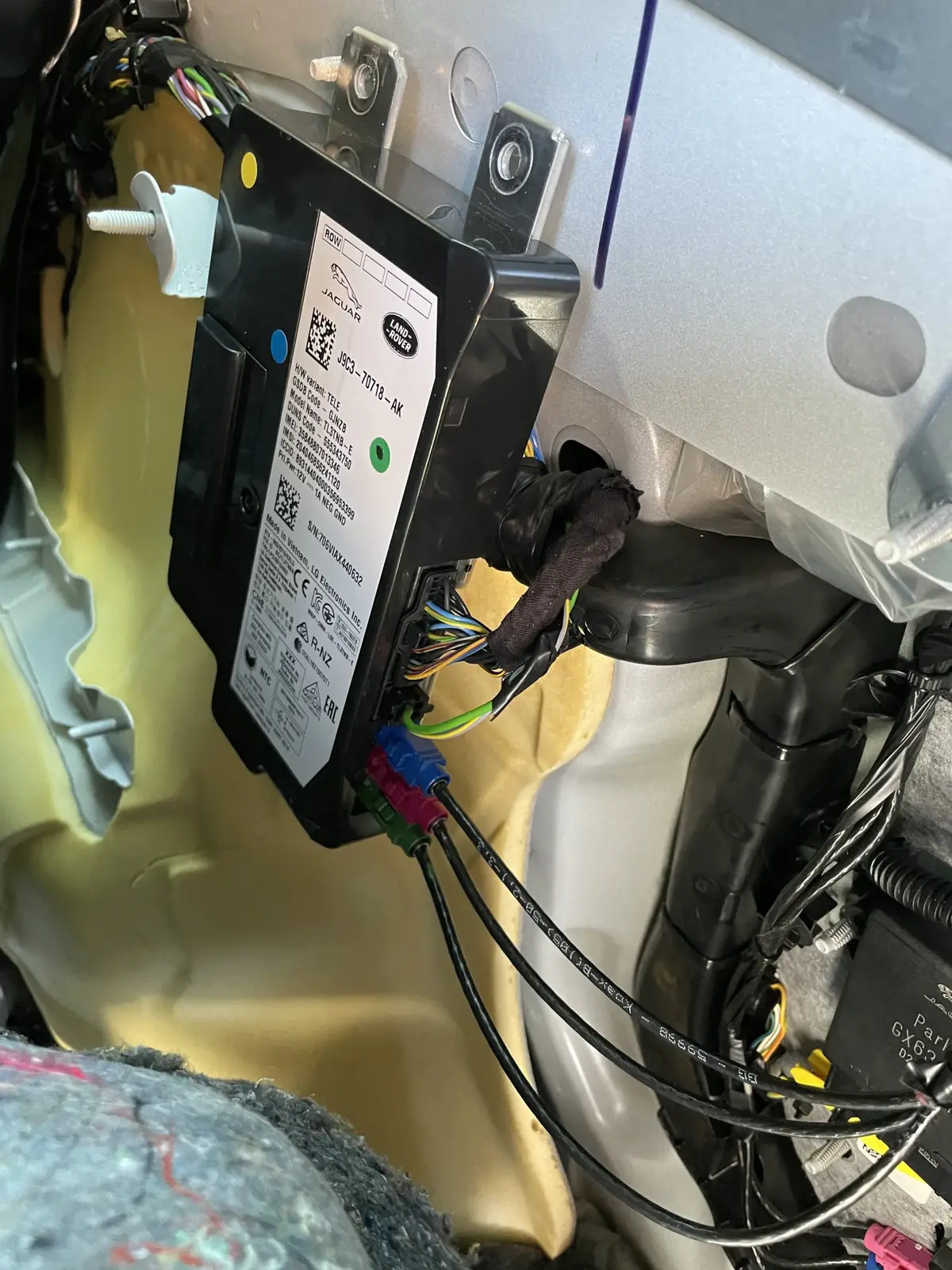
The Short Answer
The right JLR SOS System Inactive fix depends on the cause, and the causes rank predictably: an end-of-life TCU backup battery is the most common (roughly 5–8 year-old vehicles), followed by the TCU module itself, lapsed InControl subscription or provisioning faults, and antenna/wiring issues. The car drives normally throughout — this warning is about the emergency call system, not the drivetrain. Diagnose with a full scan before buying anything: the fix ranges from a cheap battery swap to a provisioned replacement module.
This guide walks the causes, the diagnosis and the repair for each.
What the SOS System Actually Is
The SOS system is JLR's emergency calling function — an automatic and manual eCall-style service that contacts emergency services after a crash or when the SOS button is pressed, running on the Telematics Control Unit (TCU) and its backup battery.
"System Inactive" means the system's self-test failed and emergency calling may not work. Background on the underlying standard: eCall. Because it is safety-related, the vehicle reports any degradation immediately — the warning is doing its job, however annoying it feels on a school run.
The Causes, Ranked
SOS System Inactive has four realistic causes, and they rank remarkably consistently across the thousands of these cases we see in remote diagnostics — start at the top of this list and work down:
- TCU backup battery at end of life. The small cell pack inside the TCU that powers emergency calling after a crash. Lives 5–8 years; the entire 2015–2020 fleet is now in the window. By far the most common cause — full details in the backup battery guide.
- TCU module failure. The module itself: internal faults, update damage, or water ingress. Often shows as the module dropping off the diagnostic network.
- Subscription / provisioning state. Lapsed InControl subscription, or a module that lost its registration (after replacement, battery events or server-side changes).
- Antenna and wiring. Roof aerial water ingress and connector faults — less common, but real, and misdiagnosed as module failure regularly.
Diagnose It in Fifteen Minutes
A full-module scan settles most SOS cases in minutes — the stored fault codes point directly at the battery, the module, or the provisioning state.
The sequence:
- Note the exact message. "SOS Limited Functionality" leans backup battery; "SOS System Inactive" that never clears leans module or provisioning.
- Full scan with JLR-capable tooling. Read the TCU's DTCs: backup battery codes vs internal module faults vs communication loss. (Tooling background: SDD vs TOPIx.)
- Check the 12 V battery. A marginal main battery produces transient SOS warnings; test it before condemning telematics hardware.
- Check InControl subscription status in the owner account.
- If codes point at wiring, inspect the roof aerial base for water and the antenna connectors before ordering modules.
No suitable scan tool? This exact diagnostic is a standard remote session — see the final section.
The Fix for Each Cause
Match the repair to the proven cause — the price difference between these paths is an order of magnitude, and guessing wrong means buying a module when a battery would have done the job.
| Cause | Fix | Cost shape |
|---|---|---|
| Backup battery | Replace the cell pack; clear codes; verify self-test | Low |
| TCU module | Used module + provisioning, or module repair | Low–mid |
| Subscription/provisioning | Renew or re-provision via online session | Low |
| Antenna/wiring | Repair aerial base, connectors, harness | Low–mid (labour) |
For the module route, our TCU replacement guide covers the swap and the provisioning step that makes SOS actually work afterwards — a new or used TCU without provisioning leaves the warning exactly where it was. If the module was bricked by a failed over-the-air update, recovery programming via the SOTA lockdown route often revives it without parts.
What NOT to Do
The two expensive mistakes with SOS warnings are replacing the TCU when the fault is actually its battery, and clearing codes without fixing anything — both turn a small job into a large invoice.
- Do not buy a TCU on the warning alone. The same message is most often a cheap battery. Dealers quoting full module replacement without a scan are answering the wrong question.
- Do not just clear the code. The self-test runs every start-up; the warning returns within days and the safety function remains degraded.
- Do not ignore it for a year. Backup-battery brownouts progressively corrupt TCU behaviour, including over-the-air updates — today's cheap battery job becomes tomorrow's bricked module.
Model-by-Model Notes
The warning behaves identically across the range, but the repair access and the common underlying cause vary enough by model to be worth a summary.
| Model | Typical cause we see | Notes |
|---|---|---|
| Range Rover L405 / Sport L494 | Backup battery | Fleet age puts nearly all in the window |
| Velar / Discovery 5 | Backup battery, TCU | Check roof aerial for water on aerial-fault codes |
| Evoque / Discovery Sport | Backup battery | High-volume models; battery-first always |
| Defender L663 / L460 generation | TCU/provisioning | Newer hardware; fewer battery failures so far |
| Jaguar XE/XF/F-Pace | Backup battery | Same telematics family, same clock |
Does the SOS warning affect the InControl app? Usually not directly — backup-battery warnings often coexist with a perfectly working app, because the app uses the main TCU functions while the warning concerns the emergency reserve. When app and SOS fail together, that combination points more strongly at the module or the account.
SOS Limited Functionality vs SOS System Inactive
The two messages are related but not interchangeable, and reading them correctly at intake saves diagnostic time — they point at different ends of the same system.
SOS Limited Functionality is the degradation warning: the system works but its reserve is compromised. This is the backup battery's signature — the TCU runs on vehicle power, but the crash-scenario reserve no longer holds charge. SOS System Inactive is the harder failure: the emergency call system is reporting itself out of service entirely, which leans towards module faults, provisioning loss or persistent communication failure. Limited Functionality that is ignored often graduates to System Inactive as the failing battery's brownouts degrade TCU operation — one more reason the cheap fix beats the wait. Both messages warrant the same first step: a full scan that reads the TCU's own fault records before any parts discussion.
Frequently Asked Questions
Is it safe to drive with SOS System Inactive? Yes for normal driving — the fault is in the emergency call system, not anything mechanical. The risk is specific: automatic emergency calling may not function after a crash. Treat it as a fix-soon item, not an emergency stop.
Why did the warning appear suddenly? The TCU self-tests at every start-up and reports the moment a threshold is crossed. The backup battery degrades silently for years, then trips the test on one ordinary morning — sudden message, slow cause. Cold weather hastens the crossing.
Will a dealer fix this under warranty? Within the vehicle warranty, yes — telematics hardware is covered. Out of warranty, expect a default quote for a new TCU; ask specifically whether the backup battery alone was tested, because it usually was not, and it is the most common cause by a wide margin.
How much does the fix cost? Backup battery replacement is the cheap end — modest parts plus trim labour. A used TCU with provisioning sits in the middle. Dealer new-module replacement is the expensive end. The scan that identifies which one you actually need is the best money in the whole job.
Does the SOS warning affect my MOT or inspection? Telematics warnings are not a standard MOT failure item in the UK, but rules vary by market and the warning should not be ignored regardless — some fleets and insurers care about functioning emergency call systems. Check local requirements if the vehicle is used commercially.
Can I turn the SOS warning off without repairing anything? No — the message is generated by the TCU's start-up self-test, so it returns every drive cycle until the underlying fault is fixed. Code-clearing without repair buys you hours, not silence. The only durable off-switch is a healthy backup battery or a healthy module behind it.
Does SOS System Inactive drain the 12 V battery? Not by itself — the warning is a report, not a load. However, one of its causes (a TCU with faulty sleep behaviour) does flatten batteries overnight, so an SOS warning combined with a car that dies after standing points at the module's sleep logic rather than the backup battery alone.
Will cold weather make the SOS warning worse? Yes, noticeably. Batteries deliver less when cold, so a marginal backup battery often trips the self-test on winter mornings and passes again in milder weather — the classic intermittent pattern. Cold-weather onset does not mean the fault is temporary; it means the battery is close enough to the threshold that temperature decides the day.
Fix It Without the Dealer Mark-Up
SX-Tool diagnoses SOS faults remotely via SX-LINK — battery vs module vs provisioning settled in one session — and provisions replacement modules worldwide. Book at sx-tool.com/en/shop/ or see module repair.