
How to Find the Right JLR TCU Part Number
The Short Answer
The reliable way to find the correct JLR TCU Part Number is a VIN lookup in the JLR Electronic Parts Catalogue via a dealer or specialist. The label on the old unit — a number like L8B2-70718-AY or LR091256 — is a useful cross-check, but hardware generations and regional variants make the VIN the only safe starting point.
Ordering a Telematics Control Unit should be simple: find the number, order the part, fit it. In practice, JLR has used dozens of TCU variants that look nearly identical and behave very differently — and the wrong one will at best disable features and at worst refuse to program entirely.
This guide walks through why the variants matter, both identification methods, and the supersession rule that protects you from stale listings. If your TCU has already failed, the JLR TCU replacement guide covers the full repair sequence.
Why TCU Part Numbers Vary So Much
JLR TCUs differ across three dimensions — cellular generation (3G versus 4G), the infotainment system they serve (InControl Touch versus Touch Pro versus Pivi Pro), and the regional radio frequencies they are certified for. Physically similar units can be electronically incompatible.
These differences are invisible from the outside:
- Cellular generation. 3G units cannot serve vehicles on networks that have shut 3G down; 4G replacements are a different part, not a software fix.
- Infotainment pairing. The TCU is configured to work with a specific head-unit generation — a Touch-era TCU will not serve a Touch Pro system.
- Regional variants. Cellular band support differs between North American, European and other market units, so cross-region swaps lose connectivity even when everything else works.
This is why "a TCU from the same year" is not a specification. If you are weighing a repair versus replacement decision, our guide to the signs of a failing JLR TCU helps confirm the diagnosis first.
Method 1: VIN Lookup via Dealer or Specialist
A VIN lookup returns the exact TCU specified for your vehicle's build — model year, infotainment system, market and equipment — directly from the JLR Electronic Parts Catalogue, including any superseded numbers. It is the fastest and only fully reliable identification method.
The process:
- Find the VIN. Base of the windscreen, driver's door jamb, or registration documents — seventeen characters.
- Contact a parts specialist. A JLR dealer parts department or a specialist supplier such as SX-Tool can run the catalogue lookup.
- Confirm the current number. The catalogue resolves your build sheet to one current part number, automatically including any supersessions.
If you want to sanity-check your vehicle's specification first, our VIN decoder identifies model, year and market from the number — useful context before you talk to a parts desk.
Method 2: Reading the Label on the Removed Unit
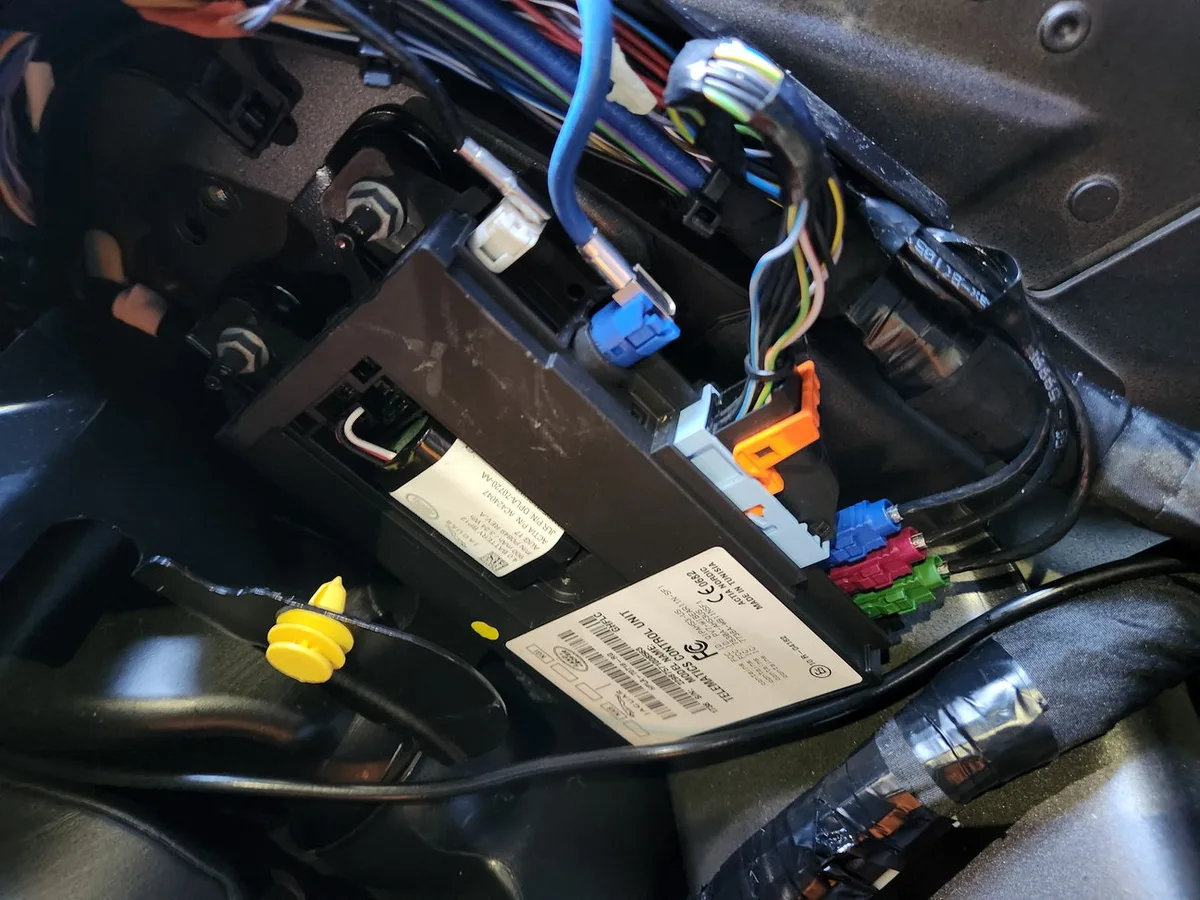
If the old TCU is already out, its label shows the fitted part number — commonly in a format like L8B2-70718-AY or a short LR number such as LR091256. Photograph the full label and use the number as a search and verification key, not as proof of what to buy today.
Label formats you will encounter:
- Engineering numbers, e.g. L8B2-70718-AY — the design-level identifier.
- Service part numbers, e.g. LR091256 or LR084929 — the orderable catalogue identifier.
- Both together, plus hardware and software revision codes.
One trap: the label tells you what was fitted, not what should be fitted now. If the vehicle had a TCU replaced previously, the label may show an older or even incorrect variant. Cross-reference against the catalogue before ordering, especially from marketplace sellers.
Understanding Supersessions
Supersession means JLR has improved a part and assigned it a new number: the old number is discontinued and replaced by a current one that fits and functions better. A competent supplier always supplies the latest supersession — but marketplace listings often quote the stale number.
The 3G-to-4G transition made supersession particularly important for TCUs. As networks switched off 3G, JLR released 4G-capable replacement units, and the catalogue now points to them for many older vehicles. Buying the original 3G number from old stock means installing a unit with no network left to connect to.
The rule is simple: whoever you buy from, verify the quoted number against the current catalogue with your VIN. If a seller cannot or will not do that, find another seller. For the connected services the TCU enables, see JLR navigation subscription renewal — a fresh TCU restores the hardware, but subscriptions restore the services.
When Replacement Is Not the Only Option
A confirmed-dead TCU usually means replacement and programming, but not every connectivity symptom is a dead unit: backup battery faults, software states and account issues mimic hardware failure. A proper diagnostic session before ordering parts can save the entire cost of the module.
Before you buy anything, rule out:
- Backup battery failure. The TCU's internal backup battery fails on its own schedule and produces alarming symptoms — see JLR TCU backup battery failure.
- Software and provisioning states. SOS faults and de-provisioned modems look like dead hardware but are software fixes — our JLR SOS system inactive fix covers the most common one.
- Account and subscription lapses. No hardware at fault at all.
A remote diagnostic session settles which of these you are facing before money moves. That is what our remote coding service is for.
Frequently Asked Questions
Where is the TCU fitted in my vehicle? Location varies by model — commonly behind the dashboard, under a seat, or in the rear quarter or boot area. A VIN-based parts catalogue lookup or workshop information for your model gives the exact position. On many vehicles it is accessible without major trim removal, but high-voltage and airbag safety rules still apply around it.
Can I fit a TCU from another market to save money? It is not recommended. Regional variants support different cellular bands, and a unit certified for North America may have limited or no connectivity on European networks — and vice versa. The saving evaporates the first time the vehicle cannot reach the JLR servers. Match the part to your market by VIN.
Does a replacement TCU need programming? Yes. A new or replacement TCU must be programmed and provisioned to the vehicle with JLR-level tooling, and the vehicle's connected services re-linked to it. It is not a plug-and-play swap. Budget for the programming session alongside the part — our team performs it remotely where the platform allows.
My TCU works but the SOS light is on — is the unit dying? Not necessarily. An SOS fault more often indicates a backup battery issue, a provisioning problem or a software state than failing TCU hardware. A diagnostic session with SDD or Pathfinder will read the exact fault and live data, distinguishing a software fix from a hardware replacement before you spend anything.
How do I check if a quoted part number is current? Give the seller your VIN and ask them to confirm the number against the JLR Electronic Parts Catalogue, including supersessions. A reputable supplier does this unprompted. Alternatively, send the VIN and the quoted number to a specialist like our team for a second check — five minutes of verification beats returning a wrong module.
Send Us Your VIN, Get the Right TCU
SX-Tool verifies TCU part numbers by VIN, supplies current-specification units, and programs replacements remotely or in the workshop. Start with the TCU replacement guide for the full picture, or contact the team directly with your VIN via the contact page.