
JLR As-Built Coding & CCF Flashing Guide
The Short Answer
JLR as-built coding starts from one fact: every Jaguar Land Rover leaves the factory with a Car Configuration File (CCF) — the master description of how that specific vehicle was built: market, options, retrofits, calibrations. "As-built coding" means reading that configuration (by VIN, from JLR's servers or the vehicle itself), editing the parameters you need, and writing it back. "Flashing" means loading new calibration software into a module. Together they are the core skill set behind retrofit work, feature activation, used-module installation and import conversions — and they are where independent workshops make real margin.
This guide explains the file types, the tools (SDD, Pathfinder, CCF editors, JET), and a workflow that will not brick a customer's car.
The File Types You Will Meet
As-built work moves between three file types, and confusing them is how modules get written with the wrong data. Learn these names before you touch anything.
| File / data type | What it is | Where it lives |
|---|---|---|
| CCF (Car Configuration File) | The vehicle's build configuration — options, market, features | Stored in vehicle modules; master copy on JLR servers by VIN |
| As-built data | The VIN-specific record of factory configuration | TOPIx Cloud / dealer systems; retrievable by VIN |
| VBF (Vehicle Block File) | Calibration/software flash images for modules | JLR IVS file server, by VIN and part number |
| Session files | SDD/Pathfinder session records incl. CCF read/writes | Your diagnostic laptop |
The essential relationship: the CCF tells modules what the car is; VBF calibrations tell them how to behave. Retrofitting a tow bar, for example, means both writing the CCF entries that declare the tow bar and flashing the modules that must now support it.
Where CCF Editing Happens
CCF editing lives in different places depending on the vehicle era: SDD handles the classics, while DoIP-era cars need TOPIx Cloud access or an engineering tool. Here is the map.
In SDD (pre-2017 vehicles)
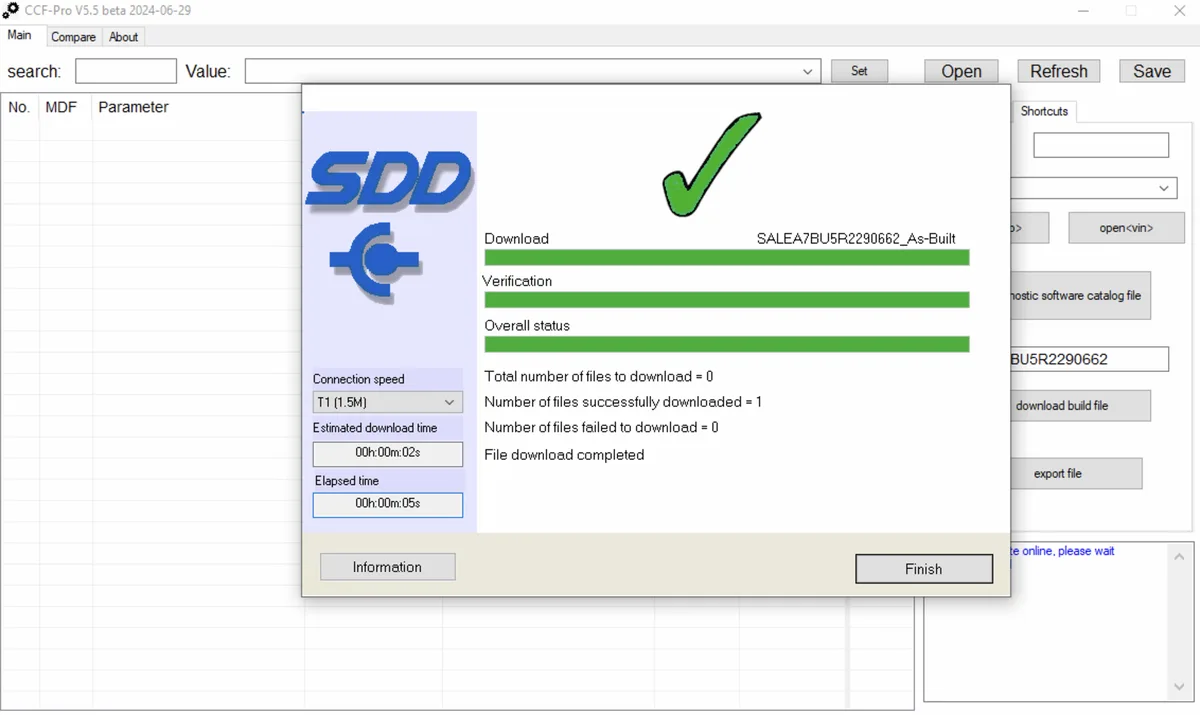
SDD includes a CCF editor under its service functions. The workflow reads the current configuration from the vehicle, presents editable parameters, and writes changes back. Coverage is broad but the interface is dated, and some parameters are only changeable with engineering (seed-key) access. Always save the original CCF read before touching anything.
In Pathfinder (2017 onwards, DoIP)
Pathfinder handles configuration through TOPIx Cloud: changes are validated against the vehicle's as-built record on JLR's servers. Genuine new-feature enablement (e.g. after fitting factory parts) runs through the online "add feature" style routines. Direct parameter hacking is deliberately restricted — which is exactly why offline CCF tools exist.
Offline CCF editors (CCF Tools, JET, and similar)
Engineering-grade editors open a saved CCF read, expose the full parameter tree (including the ones dealer software hides), validate checksums, and produce a writeable file. This is how retrofits that JLR never offered on a given market car — heated steering wheels, ambient lighting, tow assist, splash-screen changes — are actually done. The golden rules: correct file version for the platform, correct checksums, original always backed up.
A Safe As-Built Coding Workflow
The difference between a professional coding job and a bricked module is procedure, not talent. Follow this order every time, no matter how small the change looks.
- Identify the vehicle by VIN, not by badge. Pull the as-built record (TOPIx Cloud for modern cars; SDD session data for legacy) and save it.
- Read and archive the current CCF from the vehicle before any edit. Name files with VIN + date. This archive is your recovery path.
- Plan the change. List every parameter affected and every module that must agree with it. A heated-seat retrofit touches CCF, BCM configuration and often seat module calibration.
- Edit offline where possible. Make changes in an editor against the saved file, validate checksums, and only then write to the car.
- Stabilise voltage (13.5–14.8 V battery support) and remove interruptions before writing. CCF writes are short but unforgiving.
- Flash calibrations where the change requires them — correct VBF by VIN/part number, never a "close enough" file from another vehicle.
- Verify with a full-system scan and a physical function test of the new feature, plus everything that shares its modules.
- Document the change set in the customer's invoice notes.
Flashing Calibrations Without Tears
Calibration flashing is where workshops get hurt, so the non-negotiables: a wrong calibration file writes cleanly and still bricks the module, so verify part number and vehicle coverage before every flash:
- Voltage support connected and verified before the first byte moves.
- Correct file, correct module. Cross-check part number and VIN. IVS/VBF files are vehicle-specific; a calibration from a different market can change emissions behaviour or feature sets.
- Stable connection. Wired VCI to laptop, no sleep timers, no Windows updates mid-session, nobody opening doors or pressing buttons.
- Never interrupt a flash. If a session hangs, wait — many recover themselves. Pulling power mid-write is how modules die; our mistakes guide covers the recovery ladder if it happens anyway.
Where the Profitable Work Is
JLR as-built coding is the engine behind most of the high-value services independent JLR specialists sell: retrofit enablement (screens, tow bars, audio, lighting), feature activation (CarPlay/Android Auto, configurable stop-start, drive modes), import conversions (region, radio frequency, speed-limit corrections), and used-module commissioning. Vehicles like the Defender L663 and Range Rover L460 have particularly deep activation catalogues — most of it is CCF work plus a calibration flash, not hardware.
Worked Example: A Typical Retrofit Job
To make the workflow concrete, here is a heated steering wheel retrofit on a CAN-era Range Rover Sport — a job with the same shape as dozens of others:
- Hardware. Wheel, slip ring/clock spring with the heated-wheel circuits, and any trim. Part numbers verified against the VIN's build specification before ordering.
- As-built pull. The VIN's configuration record retrieved and archived, plus a full CCF read from the vehicle saved before any edit.
- CCF edit. The heated steering wheel parameter enabled in an offline editor, checksums validated, the modified file staged for writing.
- Calibration check. The BCM and steering-column module calibrations reviewed — on some build levels a calibration update (VBF flash) is required so the module exposes the heating circuit logic.
- Write and verify. CCF written on supported voltage, calibration flashed where required, then a physical test: heat at the rim within a minute, correct behaviour through the climate menu, and a full-system fault sweep showing a clean car.
Total bay time for an experienced technician: well under half a day, most of it hardware. The software steps are minutes each — when the files are right and the voltage is stable. The same pattern repeats for deployable tow bars, ambient lighting, audio upgrades and camera retrofits across the range, which is why a documented, repeatable as-built workflow is one of the most valuable disciplines a JLR workshop can build.
Frequently Asked Questions
What is a CCF file on a Jaguar Land Rover? The Car Configuration File is the vehicle's build record — every option, market setting and feature flag the car left the factory with. Modules read it to know what hardware exists and what behaviour to enable. Editing it is how retrofits and feature activations are enabled after the fact.
How do I get as-built data for a specific VIN? For modern vehicles, the authoritative source is TOPIx Cloud — JLR's official online portal — which holds the factory as-built record by VIN. For CAN-era vehicles, an SDD session read of the vehicle's configuration serves the same purpose. Engineering tools can also reconstruct as-built data from module reads.
Can I edit the CCF with Pathfinder? Pathfinder handles configuration changes through online, server-validated routines — it is not a free-form editor. For offline parameter-level editing (retrofits JLR does not officially offer on your market's car), you need an engineering CCF editor such as CCF Tools or JET, working on a saved CCF read with validated checksums.
What is a VBF file and do I need it? A VBF (Vehicle Block File) is a module calibration/software image. You need one whenever a retrofit or repair requires new module software — after fitting a used module, enabling hardware the calibration must support, or updating software levels. Files are matched by VIN and part number from JLR's IVS system.
What is the biggest risk in CCF editing? Writing a file with invalid checksums or wrong platform data — at best the write is rejected, at worst modules lose their configuration entirely. Edit offline against archived originals, validate before writing, and keep the recovery path (your saved original CCF) ready. When a write goes wrong, bricked-module recovery is usually possible.
Is CCF editing legal, and does it affect the warranty? Editing your own customer's vehicle configuration for legitimate repair and retrofit work is legal in the markets we serve, and independent repair is expressly protected in many of them. Emissions-related calibrations, odometer data and safety-system configurations are regulated separately — treat those as out of scope for casual edits. Warranty is a commercial matter: any modification can affect related warranty claims, so document changes and inform the customer.
Do I need internet access for CCF editing? For offline engineering editors, no — they work on saved CCF reads, which is one of their advantages for workshop throughput. But you do need internet for the upstream and downstream steps: pulling as-built records by VIN, retrieving IVS/VBF calibration files, and any Pathfinder/TOPIx online routines on DoIP-era vehicles. Plan sessions so downloads happen before the car is on the ramp.
Tool Up for Configuration Work
The SX-Tool ecosystem covers the full JLR as-built coding workflow: the diagnostic interface for reads and writes, JET engineering tools for offline CCF editing, and TOPIx Cloud access for as-built data and online routines. See bundles at sx-tool.com/en/shop and parameter documentation at kb.sx-tool.com.